Introduction
There is something valuable to share with everyone. It can be a personal experience, knowledge, a memorable moment, a creative idea, a life lesson, a photo, or just a thought that might help someone else.
Social networking sites are the means by which people connect, communicate and share significant moments in their lives in today's digital age. Posts are one of the strongest methods to accomplish this.
The Posts section on Talk To Friend (T2F) is where users can post content to their friends, followers, and the community. From expressing your opinions to sharing your achievements, uploading photos, telling stories, asking questions, providing helpful information, or initiating meaningful conversations, Posts provide you with the perfect platform.
Posts are designed to help you get more likes, comments, discussions, and engagement, as opposed to simple messaging, which will only reach a smaller audience. Each post is an opportunity to meet others who are interested in the same topics, have similar experiences, and share similar goals.
Whether you're a student or a professional, Posts are a way for you to connect with the community.
What are Posts in TalkToFriend?
A post is a content that users post on the TalkToFriend platform.
A post can include:
- Text
- Images
- Thoughts
- Experiences
- Announcements
- Educational information
- Creative content
- Personal updates
- Motivational messages
Posts are placed on the platform for other users to view, interact, comment and engage with. Consider a post as your own place to interact with the community. It allows you to tell your story, share your journey, and connect with people around the world.
Why is it that posts are important?
Communication is a key component for relationship and community building.
Posts help people:
- Express themselves
- Share experiences
- Learn from others
- Build connections
- Inspire communities
- Encourage discussions
- Showcase creativity
- Share knowledge
All posts are part of a larger conversation in the TalkToFriend community.
A simple post can:
- Start a discussion
- Help someone learn
- Inspire positive change
- Create friendships
- Build professional relationships
Posts turn social networking into valuable interaction.
Who Can Use the Posts Feature?
The Posts feature is for all.
Students
Students will be able to use posts to:
- Share study tips
- Discuss projects
- Ask questions
- Share educational content
- Engage in other learning activities
Example: A student studying for exams can share their revision techniques and support others to be successful.
Teachers and Educators
Teachers can:
- Share educational resources
- Provide learning tips
- Post important updates
- Inspire students
Example: The teacher can post a brief learning strategy or motivational message for students.
Professionals
Working professionals can:
- Share career advice
- Discuss industry trends
- Post achievements
- Build professional visibility
Example: Software developer can provide technology knowledge and career experiences.
Entrepreneurs
Business owners can:
- Share business updates
- Discuss ideas
- Connect with customers
- Build brand awareness
Example: A post can be used to introduce a new product or service to the market.
Travelers
Travel enthusiasts can:
- Share travel photos
- Recommend destinations
- Discuss travel experiences
- Encourage others to investigate
Fitness Enthusiasts
Fitness users can:
- Share workout routines
- Discuss health tips
- Post fitness achievements
- Motivate others
Artists and Creators
Creative individuals can:
- Share artwork
- Post photography
- Showcase talents
- Build audiences
Senior Citizens
Older adults can:
- Share life experiences
- Tell stories
- Engage in family and friends activities
- Inspire younger generations
Everyday Users
Posts can be used by anyone to share, connect, and communicate. There are no limits to creativity and self-expression.
How to Create a Post
It is easy to create a post on TalkToFriend.
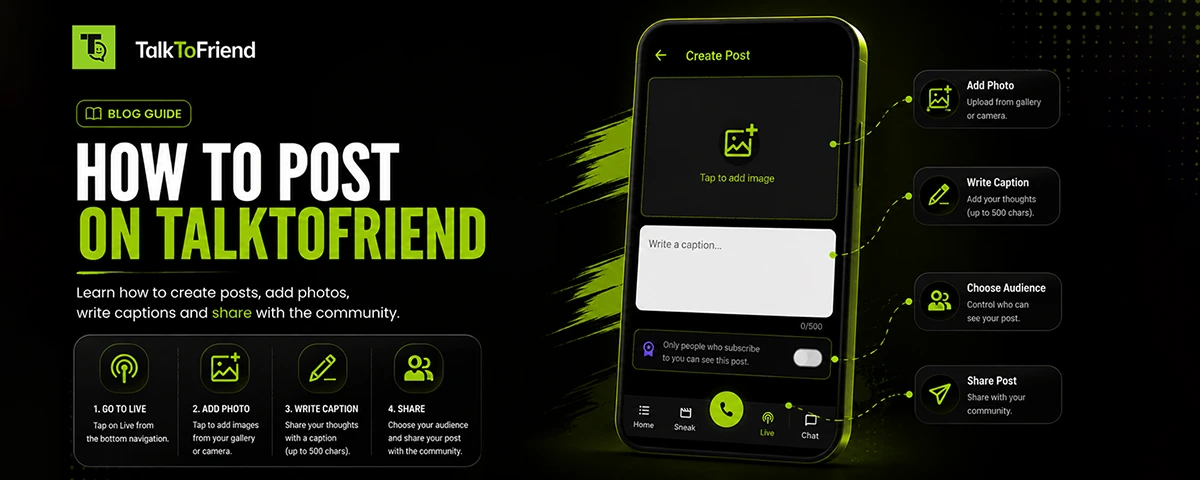
- Step 1: Open TalkToFriend app Log in to your TalkToFriend account.
- Step 2: Go to the Post Section Click on the "Create Post" button.
- Step 3: Write Your Content Enter your thoughts, message, question, story, or update.
- Step 4: Add Images (Optional) Upload photos that complement your content.
- Step 5: Read Your Post Check your content before publishing.
- Step 6: Publish Click the Post button and share it with the community.
Your post is now published for your audience.
What can you share with posts?
Posts are highly flexible. Users can share anything that has meaning and is positive.
Personal Experiences
Examples: Travel adventures, Family celebrations, Personal achievements, Memorable moments
Educational Content
Examples: Study guides, Learning tips, Educational resources, Skill development advice
Professional Knowledge
Examples: Career guidance, Industry trends, Workplace experiences, Professional achievements
Motivational Content
Examples: Success stories, Inspirational quotes, Life lessons, Personal growth journeys
Creative Content
Examples: Artwork, Photography, Writing, Music-related content
Questions and Discussions
Examples: Seeking recommendations, Asking for advice, Starting discussions, Gathering opinions
Benefits of Using Posts
- Share Your Voice: All people should have a chance to express themselves. Posts are the space in which you can share your thoughts and ideas.
- Build Connections: Similar individuals can find your content and get in touch with you.
- Increase Engagement: Posts are liked, commented on, and have meaningful conversations.
- Learn from Others: When people post from various users, knowledge and perspectives are expanded.
- Create a Personal Brand: Consistent posting can help professionals, creators and entrepreneurs gain visibility.
- Inspire Communities: Positive and educational information can inspire and encourage others.
- Stay Connected: You keep your friends, followers and communities updated on your activities and experiences through posts.
Best Practices for Creating Great Posts
- Be Authentic: Express sincere feelings and experiences. People connect more with real and honest content.
- Provide Value: Keep your audience informed, entertained, inspired or educated.
- Use Clear Language: Content is simple and easy to understand, and thus has the potential of reaching a larger audience.
- Add Relevant Images: Visual content often attracts more attention and engagement.
- Encourage Discussion: Ask questions and invite people to share their opinions.
- Stay Positive: Positive content promotes a healthy and supportive community.
Why Use Posts on TalkToFriend?
The Posts feature on Talk To Friend is designed to support meaningful communication rather than simple content sharing. Unlike platforms where content quickly disappears in crowded feeds, TalkToFriend focuses on community engagement and genuine interaction.
Posts help users:
- Connect with people
- Build relationships
- Share knowledge
- Express creativity
- Participate in communities
- Discover new opportunities
This isn't just about content, it's about conversations that matter.
How Posts Help To Build Communities
Communication is the key to community growth.
Users are encouraged to:
- Share experiences
- Help others
- Learn together
- Discuss ideas
- Support one another
All posts help create a stronger and more connected TalkToFriend community. The more users share, the more opportunities there are for learning, engagement and collaboration.
Posts for Content Creators
Posts can be used to:
- Build audiences
- Share updates
- Promote new content
- Interact with followers
- Showcase expertise
By being active and visible in the community, posting regularly can help creators stay engaged.
The Future of Posts on TalkToFriend app
As TalkToFriend continues to grow, Posts will remain one of the platform's most important communication tools.
The feature will keep on assisting the users:
- Connect with others
- Share meaningful content
- Build communities
- Inspire positive conversations
Posts will continue to be a vital part of the online communication and relationship-building process.
Conclusion
The Posts on TalkToFriend are more than just a content-sharing tool. It's a tool for communication, creativity, learning and connection. From sharing your experiences to expressing your thoughts, teaching others, inspiring communities, showing off your talents, and staying connected with friends and followers, Posts are the place to do it all.
Whether it's students, teachers, professionals, entrepreneurs, creators, travelers, fitness enthusiasts, or senior citizens, Posts is designed to allow everyone to express themselves with meaningful content and connect with others. Each post can communicate, inspire, educate and engage people from all walks of life and all world interests.
Begin to write Posts on TalkToFriend now and join a growing global community that brings ideas, experiences, knowledge and conversation together to make meaningful connections.